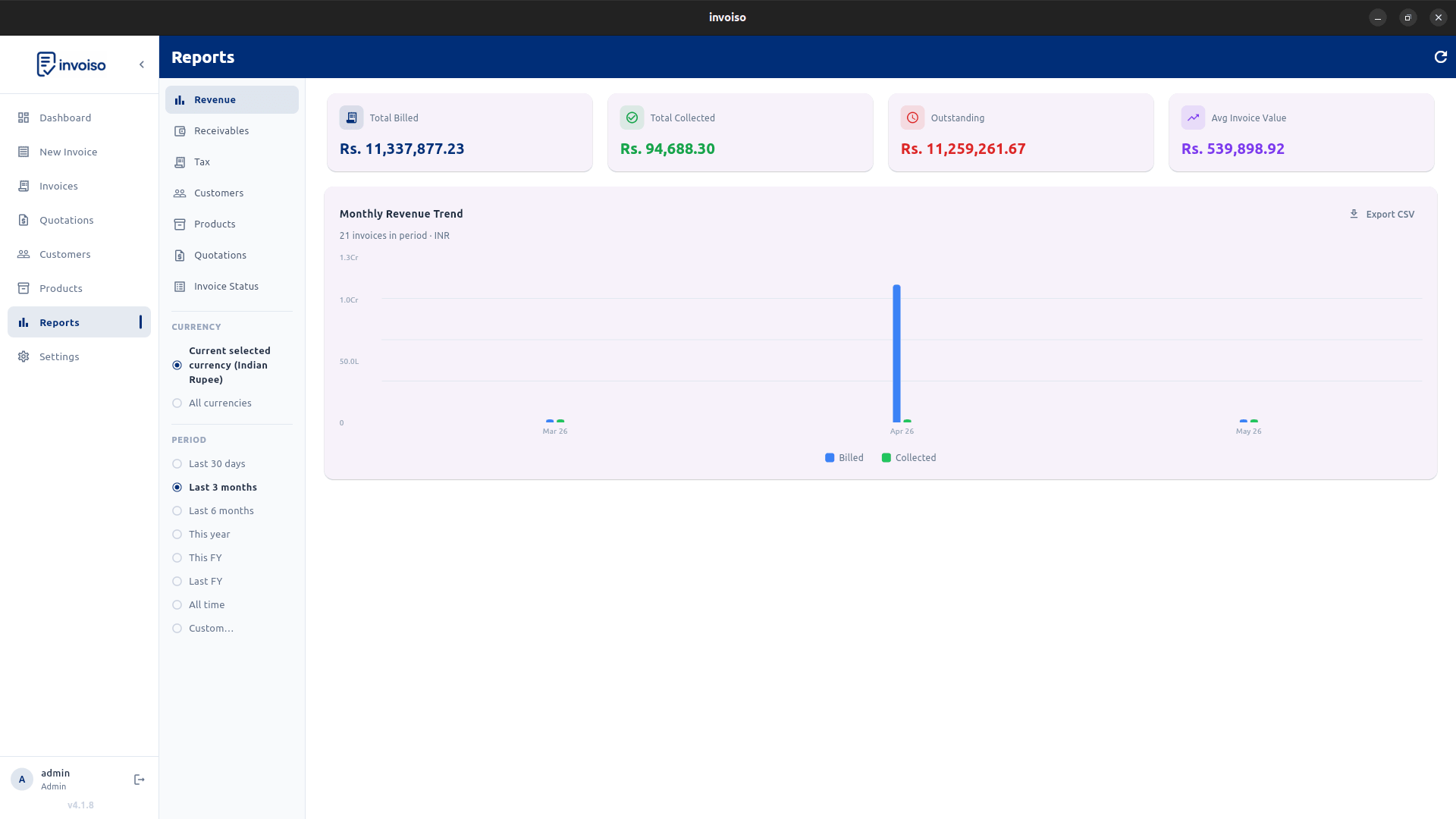
Reports are now available in Invoiso, shipped as part of the Daily Reports rollout listed in the changelog. Every report below is live in the current release — no subscription, no extra setup, and no data leaves your machine to generate any of it.
Most offline billing tools stop at generating PDFs and leave the numbers behind them buried in a database you can't easily query. That's the gap this section closes: nine report types built on the same invoice and payment data you already have, with no need to export to a spreadsheet just to see how the month is going.
What is included
- Revenue summary — billed, collected, outstanding, and average invoice value for the selected period, so you can see cash position at a glance
- Monthly revenue trend — billed vs collected by month, useful for spotting seasonal patterns or a slow quarter early
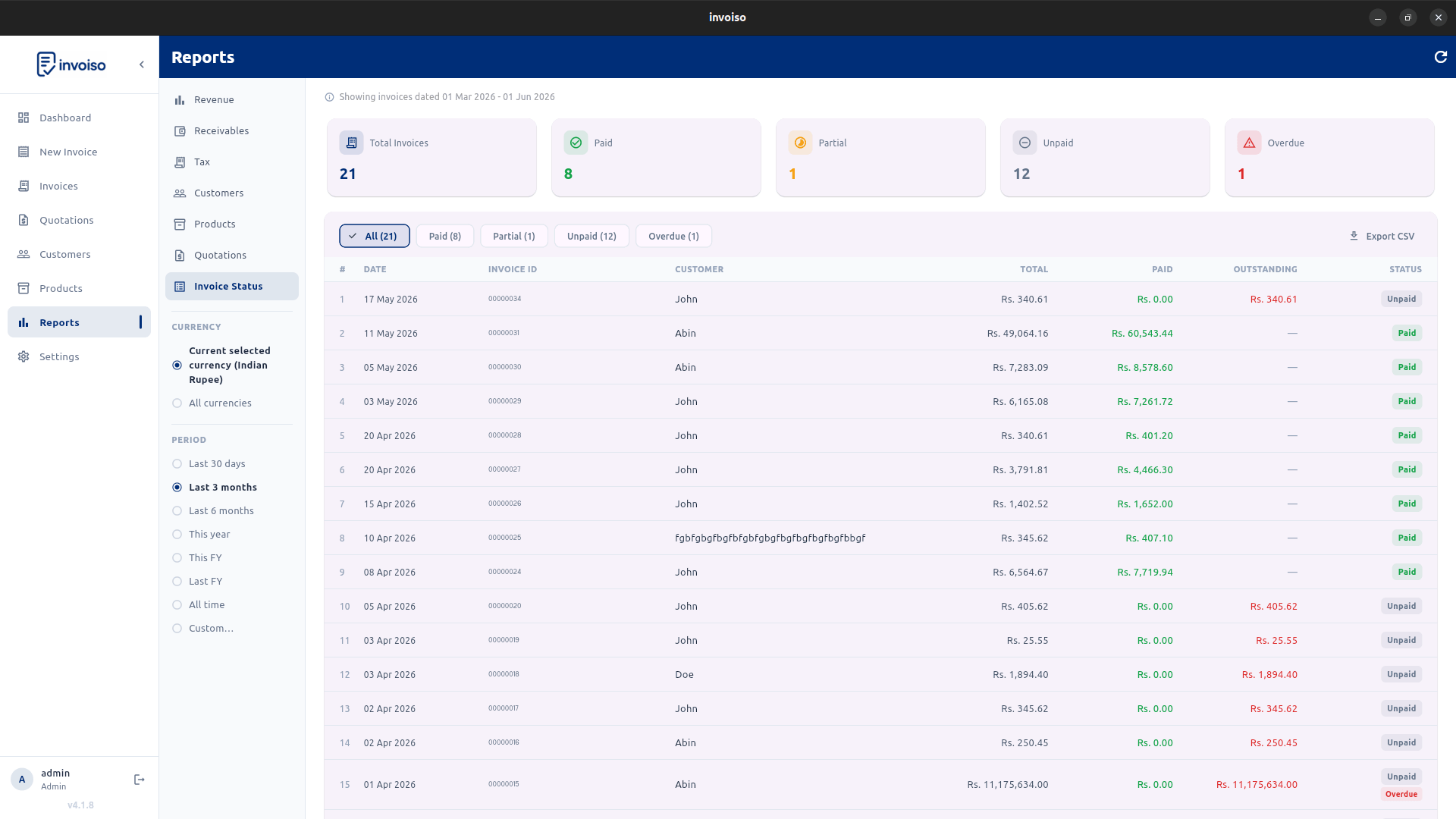
- Invoice status list — every invoice tagged paid, partial, unpaid, or overdue, with CSV export for follow-up outside the app
- Aged receivables — days overdue per outstanding invoice, sorted so the oldest unpaid amounts surface first
- Tax report — tax collected grouped by rate, built for GST filing or handing to an accountant without re-deriving the numbers
- Top customers — ranked by billed amount, so you know which accounts actually drive revenue
- Customer statements — full invoice and payment history per customer in one document, handy when a client asks "what do I owe you"
- Top products — units sold and revenue per product, for deciding what to restock or discontinue
- Currency scope — filter any report by a single active currency or view everything combined, for businesses billing in more than one currency
How to access
Open the Reports tab from the left navigation rail on the dashboard. Use the date range picker at the top of the screen to filter any report by period — this week, this month, a custom range, or all time. Each report has its own CSV export button, so a specific report can go straight into a spreadsheet without exporting the whole database.
Why this matters for a small business
Reports built into the billing tool mean the numbers stay accurate. There's no separate export-and-recalculate step where a formula error or a stale copy creeps in — every report reads live from the same invoice records that generated your PDFs. For a shop owner or freelancer doing their own books, that removes an entire category of month-end reconciliation work.
Aged receivables in particular tends to get skipped when billing and bookkeping are separate tools. Having it one tab away from the invoice list makes it realistic to actually chase overdue payments on a weekly basis instead of only at tax time.
A typical use case
A small retail business running Invoiso offline might open the Revenue Summary each Monday to check collections from the prior week, glance at Aged Receivables to see which customers are past due, and export the Tax Report at month-end for their accountant — all without touching a spreadsheet or a second piece of software.
Data stays local
Because Invoiso is offline-first, every report is generated from the local database on your machine — nothing is sent to a server to compute a revenue summary or an aged receivables list. That matters for businesses with confidentiality requirements around customer and financial data, and it also means reports load instantly with no network round-trip, even with a large invoice history.
Frequently asked questions
Do I need to upgrade to get reports? No. Reports are part of the standard release — the same free download includes the Reports tab, with no separate purchase or subscription.
Can I filter reports by a specific customer or product? The Top Customers, Top Products and Customer Statements reports are already scoped that way — Customer Statements in particular pulls the full invoice and payment history for one customer at a time, which is useful when a client disputes a balance.
What format does the CSV export use? A standard comma-separated file that opens directly in Excel, Google Sheets, or any spreadsheet tool, with column headers matching the on-screen report.
See the full breakdown of each report type in the essential business reports guide, or download Invoiso to try them now.